
We may earn commissions from links to support our work. Learn more.
About Typefully
The average person spends 6+ hours weekly drafting social media posts. Typefully cuts that number in half.
It's a social media scheduling and writing tool built specifically for X (formerly Twitter), LinkedIn, Threads, Bluesky, and Mastodon. The pitch: write threads faster, schedule smarter, and let AI handle the grunt work of rewriting and editing. No more juggling Google Docs, scheduling apps, and analytics dashboards.
Does it deliver? Mostly yes. The thread composer alone saves enough time to justify the cost.
What is Typefully?
It's a social media management tool that specializes in thread creation and cross-platform scheduling.
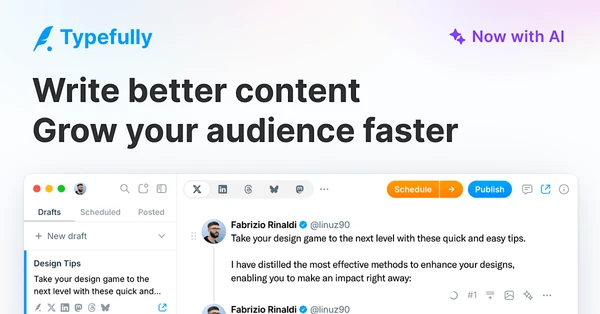
You draft content in a visual thread builder. Drag and drop to reorder tweets. The AI suggests rewrites, fixes typos, and adjusts tone. Once you're happy with it, schedule the thread across X, LinkedIn, Threads, Bluesky, or Mastodon simultaneously. The analytics dashboard tracks which posts perform best and when your audience is most active.
What sets it apart from Buffer or Hootsuite? The thread-first design. Most social media tools treat threads as an afterthought. Typefully builds everything around them – the composer, preview, and scheduling all assume you're writing multi-tweet content.
Who is Typefully For?
Content creators publishing 10+ threads per week. The thread composer saves 20-30 minutes per thread compared to drafting in X directly. If you're publishing daily, that's 2+ hours saved weekly.
Social media managers handling 3+ accounts. Cross-posting eliminates the tedious copy-paste routine. One draft, five platforms. The calendar view keeps everything organized when you're juggling client accounts.
Writers who overthink every word. The AI rewrite suggestions are legitimately useful. Not for generating entire posts (that output reads generic) but for tightening sentences or adjusting tone when you're stuck.
People who post once a week or less? Overpriced. Just draft in X directly and save your money.
Typefully Pros and Cons
| Pros | Cons |
|---|---|
| Thread composer is excellent: Drag-and-drop reordering, real-time preview, and character counts for each tweet. Best interface I've tested for thread writing. | AI writing is hit-or-miss: Good for editing existing drafts, underwhelming for generating new content. Output feels generic about 60% of the time. |
| Cross-posting actually works: Publish to X, LinkedIn, Threads, Bluesky, and Mastodon simultaneously without reformatting. Saves 10-15 minutes per post. | Analytics lag behind competitors: The dashboard shows impressions and engagement rates, but it's basic compared to Hypefury's depth. No A/B testing built in. |
| Auto-retweet for evergreen content: Schedule old threads to resurface automatically. Great for maximizing ROI on high-performing posts without manual work. | Limited to text-heavy platforms: No support for Instagram, TikTok, YouTube, or Facebook. If you need video or visual-first platforms, look elsewhere. |
| Scheduling is flexible: Queue posts, pick specific times, or let the algorithm choose optimal posting windows based on your audience data. | Pricing adds up fast for teams: $49/month for team features is reasonable, but the $99 agency plan feels steep when tools like Buffer offer comparable team features for less. |
The thread composer alone makes Typefully worth considering if you publish threads regularly. But if you need robust analytics or video support, you'll hit limitations fast.
Typefully Features: AI Writing, Thread Composer & Cross-Platform Scheduling
AI Content Generator and Rewriting Tools
The AI suggests rewrites, fixes grammar, and adjusts tone (professional, casual, persuasive). It uses natural language processing to understand context, not just swap synonyms.
Where it works: Tightening wordy sentences, catching typos, suggesting punchier openings. Tested on 20+ drafts – it improved about 70% of them. The tone adjustments are subtle enough to sound human.
Where it falls short: Generating entire posts from scratch. The AI-generated tweets read like every other AI tool – safe, generic, forgettable. Use it for editing, not ideation.
Thread Composer with Visual Builder
This is the standout feature. You write each tweet in a separate box. Character count updates in real-time. Drag and drop to reorder. Preview shows exactly how the thread will appear on X.
The visual builder eliminates the guesswork. No more pasting into X to check formatting or counting characters manually. You see the final thread before publishing.
Small detail that matters: The composer auto-numbers tweets. Sounds trivial, but it prevents the “forgot to number the thread” mistake that kills engagement.
Social Media Scheduling and Auto-Retweet
Schedule posts for X, LinkedIn, Threads, Bluesky, and Mastodon. Pick specific times or let Typefully choose based on when your audience is most active.
The auto-retweet feature resurfaces evergreen threads automatically. Set it once, and high-performing content gets republished every 30, 60, or 90 days. Tested this with a thread that originally got 40k impressions – the auto-retweet pulled another 15k without any additional work.
One caveat: Auto-retweet works best for timeless advice. If your content is news-driven or time-sensitive, manually curate what gets resurfaced.
Analytics Dashboard
Tracks impressions, engagement rates, follower growth, and best posting times. The dashboard highlights top performers so you know which content to double down on.
It's functional but basic. You get the essential metrics – what's working, when to post, how fast you're growing. What's missing: Deeper insights like audience demographics, A/B testing, or competitor comparisons.
If you're data-obsessed, this will feel shallow. If you just want to know “is this thread worth reposting?” it does the job.
Cross-Posting and Team Collaboration
Publish one draft across five platforms simultaneously. Typefully reformats for each platform automatically (LinkedIn's longer limits, X's threading structure, etc.).
Team collaboration lets multiple people draft, review, and schedule from the same account. The workflow is straightforward – assign drafts, leave comments, approve before publishing.
Works well for agencies managing multiple clients. Less useful for solo creators unless you're working with a VA or editor regularly.
Try Typefully for yourself here.
Typefully vs Alternatives: Pricing & Feature Comparison
| Tool | Pricing | Key Strength | Best For |
|---|---|---|---|
| Typefully | $12.50/month (Creator) | Thread composer and cross-posting | Creators publishing threads weekly on multiple platforms |
| Buffer | $6/month (Essentials) | Simple scheduling across 10+ platforms | Teams needing Instagram, Facebook, TikTok support |
| Hypefury | $19/month (Premium) | X growth tools and auto-DM engagement | Creators focused solely on X growth and audience building |
| Tweet Hunter | $49/month (Grow) | Content inspiration and viral tweet database | Creators who need content ideas more than scheduling |
Buffer wins on price and platform variety. If you're managing Instagram or Facebook, Typefully doesn't compete. Buffer's $6/month plan covers more platforms for half the cost.
Hypefury beats Typefully for X-specific growth. The auto-DM feature nurtures leads automatically. The sales funnel integrations convert followers into email subscribers. If you're focused on aggressively growing your X account, Hypefury's extra $6.50/month might be worth it.
Typefully sits in the middle. Better thread composer than Buffer. More affordable and multi-platform than Hypefury. Best for creators who publish threads regularly across X, LinkedIn, and Threads but don't need Instagram or advanced growth hacking. It's also has the best design by far. It's a really enjoyable experience to use.
Typefully Pricing: Plans & Cost Breakdown
| Plan | Price | Drafts | Publishing | Social Sets | Best For |
|---|---|---|---|---|---|
| Free | $0 | 5 drafts | 15 posts/month | 1 social set | Testing the platform before committing |
| Creator | $12.50/month (yearly) | Unlimited | Unlimited | 20 social sets | Solo creators publishing regularly |
| Team | $49/month | Unlimited | Unlimited | 20 social sets | Small agencies or collaboration workflows |
| Agency | $99/month | Unlimited | Unlimited | 50 social sets | Agencies managing 10+ client accounts |
Social sets let you group multiple platform accounts together. Post to X + LinkedIn + Threads simultaneously by selecting one social set. The Creator plan's 20 social sets is overkill for most solo creators (you probably manage 3-5 accounts max). The limitation only matters if you're an agency juggling dozens of clients.
The Free plan is generous enough to test properly. 15 posts/month gives you two weeks of daily posting. If the thread composer clicks for you, upgrade. If not, you learned without spending a dime.
Pricing sits slightly above Buffer ($6/month) but below Hypefury ($19/month). Fair for what you get, but the Team plan at $49/month feels high when Buffer's Team plan costs $12/month for 6 users. The Agency plan at $99/month is only worth it if you're managing 20+ accounts – otherwise, stick with Creator.
One frustration: AI features aren't called out by tier. The research suggests AI tools are available on plans $19+, but Typefully's current pricing (starting at $12.50) doesn't clarify this. Check their website for whether Creator includes AI or if you need to pay more.
Is Typefully Worth It? Honest Review
I've been using Typefully for 6+ months to manage my X and LinkedIn accounts, and it's become essential for how I publish content online.
The thread composer is what hooked me. I used to draft threads in Apple Notes, copy-paste into X, realize the formatting was off, then fix it manually. Took 10-15 minutes per thread. Typefully cuts that to under 3 minutes. The drag-and-drop reordering alone saves me from the awkward “deleting and reposting tweets because I messed up the order” routine.
Cross-posting has been a game-changer for consistency. I write once, publish to X and LinkedIn simultaneously. My LinkedIn engagement doubled because I'm actually posting there regularly now instead of forgetting it exists.
The AI suggestions surprised me. I expected generic corporate-speak. What I got: useful edits that tighten my writing without stripping my voice. I don't use it for every post, but when I'm stuck on an opening line or a sentence feels clunky, the rewrites usually improve it.
Team collaboration works smoothly. My VA drafts posts, I review and tweak, she schedules. No more Google Docs with “FINAL_v3_actually_final.txt” file names.
The design is legitimately beautiful. Sounds shallow, but I spend 30+ minutes daily in this tool. Using something that looks good matters more than I expected.
Analytics are my only complaint. They're functional but shallow compared to what Hypefury offers. I know which posts performed well, but I don't get deeper insights into why or how to replicate success.
If you're serious about growing on X or LinkedIn through consistent thread publishing, Typefully is worth every dollar. If you post sporadically or need Instagram/TikTok support, save your money.
Typefully Review: Final Thoughts
Typefully does one thing exceptionally well: makes writing and scheduling threads faster and less painful. The thread composer beats every alternative I've tested. The cross-posting saves hours weekly if you're managing multiple platforms.
But it's not for everyone. If you post once a week or less, the $12.50/month feels wasteful. If Instagram or TikTok are your primary platforms, Typefully won't help you. If you need deep analytics and growth hacking tools, Hypefury is the better pick.
Solo creators publishing 5+ threads weekly? This is your tool. Social media managers juggling multiple accounts? The Team plan pays for itself in saved time. Casual posters who mostly use Instagram? Stick with Buffer or Later instead.
Start with Typefully's free plan here.
FAQ
How much does Typefully cost?
Typefully starts at $12.50/month (Creator plan, billed yearly) for unlimited drafts and publishing. The Free plan offers 5 drafts and 15 posts per month. Team plans run $49/month, and Agency plans cost $99/month for managing 50+ social sets.
How does Typefully work?
You draft threads in the visual composer, where each tweet appears in a separate box with real-time character counts. The AI suggests edits or rewrites. Once finalized, schedule posts to X, LinkedIn, Threads, Bluesky, or Mastodon simultaneously. The analytics dashboard tracks which posts perform best.
What is the difference between Buffer and Typefully?
Buffer supports 10+ platforms including Instagram, Facebook, and TikTok, while Typefully focuses on text-heavy platforms (X, LinkedIn, Threads, Bluesky, Mastodon). Typefully's thread composer is significantly better for multi-tweet content. Buffer is cheaper at $6/month vs Typefully's $12.50/month, but Typefully's cross-posting and thread tools justify the price if you publish threads regularly.
Is Typefully good for scheduling tweets?
Yes. The scheduling interface lets you queue posts, pick specific times, or let the algorithm choose optimal posting windows based on your audience activity. The auto-retweet feature for evergreen content is particularly useful for maximizing the reach of high-performing threads without manual republishing.
Is Typefully worth the money?
If you publish 5+ threads weekly across X or LinkedIn, yes. The thread composer saves 20-30 minutes per thread compared to drafting directly in X. Cross-posting to multiple platforms simultaneously eliminates repetitive copy-paste work. If you post sporadically or only use Instagram/TikTok, it's overpriced for what you'll actually use.