
We may earn commissions from links to support our work. Learn more.
About Blitzit
Most to-do apps are glorified checklists. You type tasks, stare at them, feel overwhelmed, repeat. Blitzit tries something different: it treats your focus like a finite resource and builds task management around that reality.
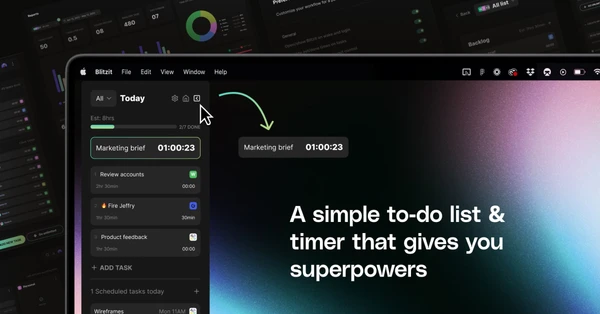
Blitzit is a task manager built on the Pomodoro technique with a focus mode called “Blitzit mode” that blocks distractions while you work. It combines time tracking, task estimation, and productivity reports with features like recurring tasks, subtasks, and integrations with Notion and Google Calendar. At $4.99/month, it's positioned as a personal productivity tool that helps you figure out where your time actually goes.
The app also includes notes, file attachments, and real-time alerts. It's not trying to replace your entire workflow. It's designed to make you better at estimating how long work takes and actually finishing it.
Try Blitzit and see how it transforms your productivity.
What is Blitzit?
Think of it as a Pomodoro timer that evolved into a full task manager.
You create tasks, estimate how long they'll take, and then work on them in focused intervals. The “Blitzit mode” locks you into a single task – no notifications, no distractions, just the work in front of you. When the timer ends, you log what you actually accomplished.
The productivity reports show where your estimates were off and where your time disappears. Recurring tasks handle the repetitive stuff automatically. Subtasks break big projects into smaller chunks. The Notion integration means you can pull tasks from your workspace, and Google Calendar sync keeps everything aligned with your schedule.
It's not revolutionary. It's just structured focus with better tracking than most to-do apps bother with.
Who is Blitzit For?
Blitzit works for people who struggle with time estimation and need external structure to focus.
Freelancers billing by the hour get accurate time tracking without toggling between apps. The reports show exactly what took 3 hours versus what took 30 minutes, which makes invoicing less guesswork.
Students juggling multiple deadlines benefit from the task estimation features. Breaking a research paper into subtasks with individual time estimates makes the work less abstract and more manageable.
Remote workers drowning in Slack notifications use Blitzit mode to carve out distraction-free blocks. Two hours of actual focus beats eight hours of constant interruptions.
Here's who should look elsewhere:
- Teams needing collaboration features – Blitzit is personal productivity, not project management
- People already using a system that works – switching task managers rarely improves anything
- Anyone allergic to the Pomodoro technique – this tool doubles down on timed intervals
Blitzit Pros and Cons
| Pros | Cons |
|---|---|
| Affordable pricing: $4.99/month is cheaper than Todoist Premium ($5/month) and significantly less than Sunsama ($20/month) | Limited integrations: Only Notion and Google Calendar work now. ClickUp, Figma, and others are “coming soon” |
| Focus mode that actually blocks distractions: Blitzit mode keeps you on one task without the temptation to check other lists | No team features: Can't assign tasks to others or share lists, which limits usefulness for collaborative work |
| Time tracking built in: See how long tasks actually take versus your estimates without a separate timer app | AI features still in development: Task creation is only 65% complete as of 2026, so core features aren't fully baked yet |
| Productivity reports show patterns: Analytics reveal which types of tasks you underestimate and when you're most productive | Mobile app parity unclear: Can't verify if iOS and Android have all the same features as the web version |
The balance here depends on what you need. If you want personal productivity with strong focus tools and don't care about team features, Blitzit delivers at a good price. But if you're expecting mature integrations or AI capabilities, you're essentially betting on future updates.
Blitzit Features: Focus Mode, Time Tracking & Task Management
Pomodoro Timer with Blitzit Mode
The core feature is a focus mode that locks you into a single task. When you activate Blitzit mode, other tasks disappear from view. Notifications get blocked. You work on one thing until the timer ends.
This isn't just a standard Pomodoro timer. Most apps let you see your entire task list while working, which defeats the purpose. Blitzit removes the distraction of everything else you should be doing.
The timer is customizable, so you're not stuck with the traditional 25-minute intervals. Some tasks need 45 minutes of sustained focus. Others need 15. You decide.
Task Estimation and Time Tracking
Every task gets an estimated duration. When you complete it, Blitzit logs how long it actually took.
The gap between your estimate and reality is where the learning happens. If you think client emails take 20 minutes but they consistently take 40, the data shows it. Next time you plan your day, you'll be more accurate.
This isn't automatic time tracking like RescueTime. You start and stop timers manually. Some people will forget. But the manual aspect also forces you to be intentional about what you're tracking.
Productivity Reports and Analytics
The reports break down where your time goes by task type, day of week, and accuracy of estimates.
You can see that Thursdays are your most productive days or that administrative tasks always take twice as long as you think. These patterns are hard to notice without data.
The analytics aren't as detailed as Toggl Track, which offers billable hours, client breakdowns, and team reports. Blitzit focuses on personal insights rather than client billing.
Recurring and Scheduled Tasks
Set tasks to repeat daily, weekly, or on custom schedules. The app generates new instances automatically.
Scheduled tasks appear at specific times rather than sitting in your backlog forever. Morning standup at 9am. Weekly review every Friday. You don't have to remember or manually recreate them.
This feature exists in almost every task manager, but Blitzit combines it with time blocking, which makes scheduled tasks feel more actionable.
Notes and File Attachments
Tasks support notes and file uploads. Meeting prep tasks can include agendas. Client work can have reference documents attached.
The notes aren't fancy – no rich text formatting or tables. Just plain text. For detailed documentation, you'll still need Notion or Google Docs. But for quick context on a task, it works.
Notion and Google Calendar Integration
Pull tasks from Notion databases into Blitzit. Changes sync both ways, so completing a task in Blitzit marks it done in Notion.
Google Calendar integration shows your scheduled tasks alongside your meetings. Time blocking becomes easier when you see available slots visually.
The integration list is short compared to competitors. ClickUp, Figma, Trello, Asana, and Linear are all listed as “coming soon.” If you need those now, you're out of luck.
Key limitations to note:
- No API access for custom integrations
- No mobile-specific features like location-based reminders
- No collaboration features like shared lists or task assignments
Start your free trial and experience focused productivity.
Blitzit vs Alternatives: Pricing & Feature Comparison
| Tool | Pricing | Key Strength | Best For |
|---|---|---|---|
| Blitzit | $4.99/month | Focus mode that blocks distractions | Solo workers who need structure and time tracking |
| Todoist | $5/month | Mature feature set with dozens of integrations | People who want reliability over innovation |
| Sunsama | $20/month | Daily planning ritual with calendar integration | High earners who value time over money |
| TickTick | $2.99/month | Habit tracking and calendar view | Budget-conscious users who want all-in-one functionality |
Todoist wins on reliability and integration ecosystem. It's been around since 2007 and works with everything. But it doesn't have built-in time tracking or focus modes. You'd need Toggl or another app alongside it.
Sunsama offers similar time blocking and daily planning features to Blitzit but costs 4x as much. The interface is more polished and the integrations are more mature. If you're billing $150+/hour, the price difference doesn't matter. For everyone else, Blitzit makes more sense.
TickTick is cheaper at $2.99/month and includes a Pomodoro timer. But the focus mode isn't as restrictive as Blitzit's, and the productivity analytics are basic. If you need detailed time tracking data, TickTick won't cut it.
Blitzit sits in the middle: more focused than Todoist, cheaper than Sunsama, better tracking than TickTick. Pick it if personal productivity and time awareness matter more than team features or a massive integration library.
Blitzit Pricing: Plans & Cost Breakdown
Blitzit offers two pricing options: a monthly subscription and a lifetime deal.
| Plan | Price | What You Get |
|---|---|---|
| Monthly Plan | $4.99/month | All features, unlimited lists and tasks, cancel anytime |
| Blitz for Life | $97 one-time (was $155.20) | All features, unlimited lists and tasks, all future updates, lifetime access |
The monthly plan is straightforward. Pay $4.99, use everything, cancel if you don't like it. No annual commitment required.
The lifetime deal is where it gets interesting. $97 upfront gets you permanent access with all future updates included. If you use Blitzit for 20 months, you break even. After that, you're saving money every month compared to the subscription.
Lifetime deals usually signal one of two things: a new tool trying to raise capital quickly, or a mature tool with a loyal user base offering a loyalty reward. Blitzit appears to be the former. The “ending soon” language creates urgency, which is standard marketing but worth noting.
The 30-day money-back guarantee reduces risk. Try it for three weeks, and if it doesn't stick, get a refund.
There's also a 7-day free trial. No credit card required upfront. That's better than tools like Sunsama, which require payment details before you can test anything.
Compared to competitors, Blitzit is priced aggressively. Todoist Premium is $5/month with no lifetime option. Sunsama is $20/month or $240/year. TickTick Pro is $2.99/month. Among focus-oriented task managers, Blitzit hits a sweet spot: cheap enough to try, substantial enough to take seriously. If you're looking for tools that balance price and capability, check out the top-rated options in our leaderboard.
Is Blitzit Worth It? Honest Review
I've been using Blitzit for a few months now, and the difference in my productivity is hard to ignore. Before this, I was constantly context-switching between tasks, getting distracted by notifications, and never really knowing where my time went.
What I like most is how the tool forces me to confront reality about time. I used to think I could knock out emails in 15 minutes. Blitzit showed me it consistently takes 35-40 minutes. That awareness alone changed how I plan my days. I stopped overcommitting and started blocking realistic amounts of time for work.
The focus mode is legitimately effective. When I'm in Blitzit mode, I can't see my other tasks or get pulled into checking Slack. It's just me and the work. I finish things faster because I'm not mentally juggling five other priorities.
The design is another win. A lot of productivity tools feel cluttered or ugly. Blitzit is clean and pleasant to use. Small thing, but it matters when you're opening the app 20 times a day.
The stress reduction is real. I used to end workdays feeling like I'd been busy but didn't accomplish much. Now I can see exactly what I finished and how long it took. That clarity makes me feel more in control.
If I had to pick a complaint, it's that the integrations are still limited. I'd love to pull tasks from more tools, but right now it's just Notion and Google Calendar. The upcoming additions will help, but they're not here yet.
Overall, Blitzit delivers on its promise: better focus, better time awareness, less stress. For $4.99/month, that's a solid return.
Blitzit Review: Final Thoughts
Blitzit is a focused task manager that actually helps you focus. The Pomodoro-based approach isn't for everyone, but if you struggle with time estimation or get distracted easily, it works. At $4.99/month, it's cheaper than most alternatives and includes time tracking that would cost extra with other tools.
The lifetime deal at $97 is worth considering if you're confident this approach fits your workflow. The 7-day trial and 30-day refund window give you enough runway to figure that out without financial risk.
Skip this if you need team collaboration, prefer flexible task management without timed intervals, or require a mature integration ecosystem today. Choose Todoist for reliability, Sunsama for polish, or TickTick for budget flexibility. But if personal productivity and time awareness are your priorities, Blitzit delivers better than most tools twice its price. For more curated productivity tools, explore the latest additions we've tested.
Get Blitzit and take control of your focus today.
FAQ
Is Blitzit a good app?
Blitzit is good if you need structure around focus and time tracking. The Pomodoro-based approach works for people who get distracted easily or underestimate how long tasks take. At $4.99/month, it's solid value compared to competitors like Sunsama ($20/month). Not ideal if you need team features or prefer flexible task management without timed intervals.
What problems does Blitzit solve?
Blitzit solves time estimation inaccuracy and distraction during work. It shows you the gap between how long you think tasks take versus reality, which improves future planning. The focus mode blocks other tasks and notifications, forcing single-task concentration. It's designed for people who lose hours to context-switching and want data on where their time actually goes.
How much does it cost to use Blitzit?
Blitzit costs $4.99/month for the subscription plan with all features and unlimited tasks. There's also a lifetime deal for $97 (discounted from $155.20) that includes all future updates. A 7-day free trial lets you test it first, and there's a 30-day money-back guarantee on paid plans.
Is the Blitzit app free?
Blitzit offers a 7-day free trial. After that, it costs $4.99/month or $97 for lifetime access. There's no permanent free tier with limited features like Todoist offers. The trial gives you full access to test whether the focus mode and time tracking fit your workflow before paying.
What alternatives are there to Blitzit?
Todoist ($5/month) offers more integrations and reliability. Sunsama ($20/month) provides similar time blocking with better polish. TickTick ($2.99/month) is cheaper with basic Pomodoro features. Notion and Asana handle tasks but lack built-in focus modes. Pick Blitzit if you want focus tools and time tracking without paying Sunsama's premium or settling for TickTick's basic analytics.