
We may earn commissions from links to support our work. Learn more.
About Voicenotes
You have 47 voice memos scattered across your iPhone's Notes app. Three more recordings in Google Keep. Another handful buried somewhere in Notion. When you need to find that one brilliant idea you recorded last Tuesday? Good luck.
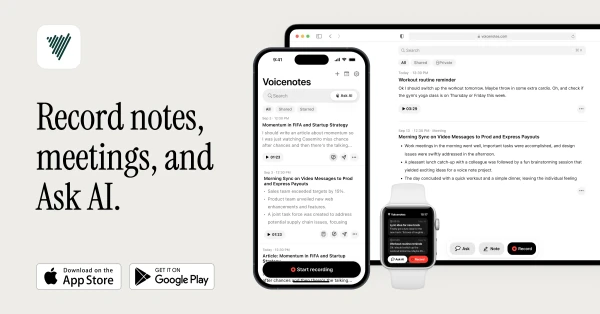
Voicenotes fixes this mess. It's an AI note-taking app that records your thoughts, transcribes them instantly, and actually remembers what you said so you can ask questions later. Works across your phone, computer, smartwatch, and even inside meetings without deploying an annoying bot.
Start capturing your thoughts with Voicenotes.
What is Voicenotes?
At its core, Voicenotes is a digital note-taking tool that prioritizes your voice over your keyboard. Hit record on any device, speak naturally, and it transcribes everything into searchable text. The AI doesn't just transcribe though. It remembers context across all your notes, so you can ask it questions like “what did I say about my project deadlines last week?” and get actual answers.
The transcription handles 100+ languages, recognizes names you teach it, and processes natural speech patterns. That's a step up from most dictation tools that demand you speak like a podcast host.
What makes it different from standard voice memo apps is the knowledge management layer. Every note you record becomes part of a searchable second brain. The AI connects dots between your thoughts, helps you turn rambling ideas into structured content, and generates everything from blog posts to to-do lists based on what you've recorded.
Who is Voicenotes For?
This isn't for everyone. Here's who gets the most value:
- Content creators who capture 10+ rough ideas per week but lose half of them in various apps
- Journalers who prefer speaking their daily reflections over typing them (takes 60% less time)
- Knowledge workers drowning in meeting notes who need transcripts without calendar bots
- ADHD folks who think faster than they type and need to dump thoughts immediately
- Anyone managing a “second brain” who wants voice as an input method for their knowledge system
Skip this if you already have a note-taking system that works perfectly, rarely think in spoken form, or don't trust AI with your private thoughts. Also skip if you exclusively take visual notes with sketches or diagrams.
Voicenotes Pros and Cons
| Pros | Cons |
|---|---|
| AI Memory System: The “Ask my AI” feature searches and synthesizes information across your entire note history. Great for retrieving specific details from months ago. | Cannot Upload Existing Audio: No way to import pre-recorded audio files for transcription, limiting use for processing existing recordings or interviews. |
| Exceptional Transcription Accuracy: High-quality transcription in 100+ languages that handles noisy environments, whispers, and multilingual recordings. Removes pauses and filler words automatically. | No Speaker Differentiation: Transcriptions don't distinguish between different speakers, making it less useful for multi-person meetings or interviews. |
| True Cross-Platform Availability: Works seamlessly across iPhone, Android, Mac, Windows, Apple Watch, WearOS, and web. Genuine parity across all platforms. | Advanced Features Paywalled: Key features like unlimited recording, GPT-4/Claude Opus, and premium integrations require paid subscription ($10/month). |
| Friction-Free UX: Opens directly to recording screen with no unnecessary steps between thought and capture. Fast and intuitive design. | Limited Note Linking: Cannot link notes to each other or to external resources, which hampers building a connected knowledge base. |
Voicenotes excels at what it's designed for: capturing and organizing your own thoughts through voice. The transcription quality is genuinely impressive, and the AI memory system that lets you search across all your notes is a standout feature that competitors struggle to match.
Voicenotes Features: AI Transcription, Meeting Recording & Custom Content Generation
Smart Transcription with Context
The transcription engine handles 100+ languages, recognizes names you train it on, and processes natural speech patterns. The practical benefit is fewer manual corrections when you're reviewing notes later. Most voice tools still require you to edit out nonsense words or fix mangled proper nouns. If this genuinely reduces cleanup time by even 30%, that's worth something.
Meeting Recording Without Bot Intrusion
Record both in-person and online meetings with one click. The Mac app specifically allows you to record meetings without a bot. You get full transcripts and AI-generated summaries without everyone on the call seeing a recording bot join. This matters more than you'd think. People get defensive when they see recording bots.
Voice Note Capture Across Every Device
Quick capture works from iPhone, Android, Mac, Windows, Apple Watch, WearOS, web browsers, and a Chrome extension. That's genuinely comprehensive. The Apple Watch integration is particularly useful because you can record thoughts during walks without pulling out your phone. WearOS even includes a watch face complication for instant recording and a tile for quick access to recent notes. Your grocery lists, book highlights, health logs, and random 2am ideas all go into one searchable system instead of fragmented apps.
Ask AI Feature for Memory Recall
This is where the “second brain” concept actually functions. The AI reads across all your recorded notes and answers questions about what you've said. Ask “what were my main concerns about the website redesign?” and it pulls relevant quotes from multiple recordings. It's basically full-text search combined with synthesis. Better than manually scrolling through 200 voice memos hoping you recognize the right one.
Custom Prompts for Content Generation
You can create reusable prompts that transform voice notes into specific outputs. Record a 5-minute brain dump, apply your “blog post outline” prompt, and get a structured draft. Or use a “meeting action items” prompt to extract tasks from rambling discussion notes. The flexibility here is significant because you're not locked into the developer's idea of useful outputs.
Key capabilities include:
- Turning rough ideas into polished emails
- Converting journal entries into structured reflections
- Generating to-do lists from spoken thoughts
- Creating blog drafts from verbal outlines
Privacy and Data Security
All notes remain private, even within shared team accounts. The app emphasizes privacy and security in its policies. If you're comparing this to free tools that explicitly mine your data for model training, the privacy stance is better. For specific compliance certifications, verify directly with Voicenotes.
Try Voicenotes for yourself here.
Voicenotes vs Alternatives: Pricing & Feature Comparison
| Feature/Aspect | Voicenotes | Otter.ai | Apple Voice Memos + ChatGPT |
|---|---|---|---|
| Pricing | $14.99/month or $99.99/year | $16.99/month Pro plan | Free (both apps separate) |
| Transcription | 100+ languages with context | Strong accuracy, 30+ languages | Basic accuracy, no context memory |
| AI Memory | Searches and synthesizes across all notes | Per-conversation only | None (manual copy-paste to ChatGPT) |
| Meeting Recording | No visible bot joins calls | Bot joins as participant (everyone sees it) | Manual recording only |
| Custom Prompts | Built-in with reusable templates | Limited to preset summaries | Fully custom but requires manual workflow |
| Best For | Individual knowledge workers building a second brain | Teams needing collaborative transcripts | Budget users willing to use two separate apps |
Voicenotes wins on AI capabilities and invisible meeting recording. Otter wins if you need team collaboration features and don't mind the bot visibility. The Apple + ChatGPT combo is cheapest but requires you to manually shuttle transcripts between apps, which defeats the point of quick capture.
For solo users who record 20+ notes per week and want AI to connect their thoughts, Voicenotes makes sense at $8.33/month annually. For teams, that $49/month plan gets expensive fast depending on team size. Choose based on whether you value seamless AI integration over collaborative features.
Voicenotes Pricing: Plans & Cost Breakdown
| Plan | Price | Key Features |
|---|---|---|
| Individual | $14.99/month or $99.99/year | Full transcription, AI memory, meeting recording, custom prompts, all devices |
| Team | $49/month for entire team | All Individual features plus shared team access |
The annual plan works out to $8.33/month, which is reasonable for an AI-powered tool that replaces both a transcription service and a note-taking app. Compare that to Otter's $16.99/month or Notion's $10/month, and it sits in the middle of the market.
The Team plan is actually a solid deal. At $49/month flat for unlimited seats, the per-person cost drops dramatically as your team grows. A team of 3 pays $16.33/person, but a team of 10 pays just $4.90/person. This flat-rate model makes it particularly attractive for larger teams and removes the usual headache of per-seat pricing that can balloon your budget as you scale.
For individuals, the value depends on how much you use it. Record 5+ notes per week? Probably worth it. Record one note per month? You're paying $15 for something you barely use. The lack of a free tier means you can't test the transcription quality before committing, which is a gamble when evaluating the tool against established alternatives.
Is Voicenotes Worth It? Honest Review
I've been using Voicenotes as a journal for the past few months, and the convenience factor is real. I can just open my phone, hit record, and talk through my thoughts without worrying about typing on a small keyboard. Everything gets transcribed and filed away where I can actually find it later, which sounds basic but solves my biggest problem with voice memos scattered everywhere.
The AI chat feature surprised me with how useful it actually is. I can ask questions across all my journal entries at once, which helps me spot patterns in my thinking I wouldn't notice otherwise. For example, I asked it what I'd been stressed about most this month and it pulled relevant quotes from different days. That kind of synthesis would take hours manually.
What I love most is the custom prompt system. I've set up a few prompts that turn my rambling voice notes into specific formats I use regularly. One prompt converts messy thoughts into structured blog outlines. Another extracts action items from my planning sessions. It's basically created little generators that work exactly how I need them to. That level of customization makes it feel less like using someone else's tool and more like building my own system.
Voicenotes Review: Final Verdict
Voicenotes delivers what it promises for voice-first thinkers who want AI assistance beyond basic transcription. The cross-platform availability is genuinely comprehensive, the AI memory feature adds real value for knowledge management, and custom prompts provide flexibility most competitors skip.
The pricing sits in the reasonable range for individuals at $8.33/month annually, but team pricing needs clarification. If you record 10+ voice notes weekly and want them organized with AI synthesis, this works well. If you mostly type your notes or need collaborative editing features, stick with Notion or Obsidian. For voice journalists and content creators who think out loud, it's worth testing.
Start your second brain with Voicenotes here.
FAQ
Does Voicenotes work offline or need internet connection?
The source material doesn't specify offline functionality. Recording might work locally, but transcription and AI features likely require internet since they use cloud-based processing. Contact support to confirm before relying on it in airplane mode.
Can I export my voice notes and transcripts to other apps?
Voicenotes integrates with Notion, Todoist, Readwise, WhatsApp, and Zapier for custom workflows. You can also import audio and other files into the app. For specific export format options, verify directly with Voicenotes support.
How accurate is the transcription compared to other tools?
Voicenotes offers transcription in 100+ languages and handles natural speech patterns. While the app provides high-quality transcription, independent accuracy benchmarks aren't publicly available for direct comparison.
Does the Team plan have a seat limit or is it truly unlimited?
The Team plan costs $49/month for “the entire team”. They claim it is actually unlimited.
Is my voice data used to train AI models?
Voicenotes emphasizes privacy and security, with all notes remaining private even within shared team accounts. For specific details about data usage policies and current compliance certifications, verify directly with Voicenotes.offline mode