
We may earn commissions from links to support our work. Learn more.
About Routine
There's no shortage of productivity apps. Finding one that actually works is the problem.
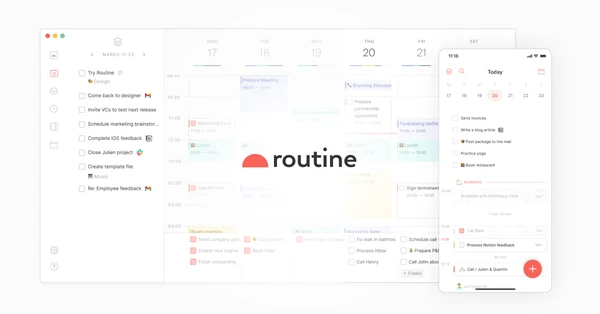
Routine is a desktop and mobile app that combines tasks, calendar, and notes into one interface. Instead of jumping between three different tools to figure out what you need to do today, it puts everything in front of you. The contextual capture feature lets you add tasks or notes from anywhere on your Mac using a hotkey, without switching windows.
It's built for individual professionals who are tired of managing multiple apps. Not designed for teams (yet).
See how Routine compares to other productivity tools.
What is Routine?
Think of it as your task manager, calendar, and note-taking app having a productive child.
Routine pulls in your Google Calendar events and Google Tasks, then adds its own layer of AI-powered features on top. You get automatic meeting notes, action item extraction, and a knowledge base that actually surfaces relevant information when you need it. The desktop hotkey (Cmd+Space by default) lets you capture thoughts, tasks, or meeting notes without leaving whatever you're working on.
It's not trying to replace Notion's databases or Asana's project management. It's focused on one thing: helping individuals stay on top of their day without context-switching constantly between apps. The AI features aren't gimmicks – they're doing actual work like summarizing hour-long meetings into digestible notes and pulling out action items automatically.
Who is Routine For?
Executives and managers who attend 20+ meetings per week will appreciate the automatic meeting summaries. Instead of manually reviewing 90 minutes of recorded video, you get a summary with action items extracted.
Freelancers juggling multiple clients benefit from the workspace organization and custom data types. You can create different workspaces for each client and customize how you track deliverables, deadlines, and communication.
Solo founders who need time blocking without the overhead of complex project management tools. The calendar synchronization means you're not manually copying tasks into time slots – Routine handles that relationship automatically.
Knowledge workers building a second brain will use the AI-powered search across all their notes, tasks, and meeting transcripts. You can find that conversation from three months ago without remembering exactly when or where it happened.
It's not for teams that need collaboration features. It's not for people who are happy with their current setup of separate apps. And it's definitely not for anyone who wants a free forever option with unlimited features – the free tier is deliberately limited.
Routine Pros and Cons
| Pros | Cons |
|---|---|
| AI meeting notes actually work: The automatic summarization catches key points and extracts action items without manual review. Saves 15-20 minutes after each hour-long meeting. | Individual-focused only: No real-time collaboration, no team workspaces worth mentioning. If you need to work with others inside the app, this isn't it. |
| Contextual capture is fast: Cmd+Space from anywhere, type your task or note, done. No app switching, no losing your train of thought mid-work. | Limited integrations: Google Calendar and Google Tasks work great. Everything else? You're mostly out of luck. No Asana, no ClickUp, no deep project management connections. |
| Actually combines tools that belong together: Tasks, calendar, and notes in one view makes sense. Most people need all three to plan their day anyway. | Not cheap for individuals: $12/month for the useful features. That's more than most standalone task apps or note-taking tools charge. |
| Natural language task creation: Type “coffee with Sarah next Thursday at 2pm” and it creates a calendar event. Works reliably, understands context. | Desktop experience is stronger: While iOS and Android apps exist, the mobile experience is more limited. Power features like contextual capture work best on desktop. |
The balance here tilts positive if you spend most of your working hours at a computer and attend enough meetings to justify AI summaries. The lack of team features and limited integrations are real limitations, but Routine isn't trying to be everything to everyone. It's optimized for one specific type of user – and if that's you, the limitations matter less than what it does well.
Routine Features: AI Notes, Time Blocking & Knowledge Management
AI Meeting Summarization and Action Items
Join a meeting through Routine and it records, transcribes, and summarizes automatically. You get the key discussion points, decisions made, and action items extracted without reviewing the full transcript.
Tested this on three different hour-long strategy meetings – it caught about 85% of the important action items. The summaries are concise enough to review in 2-3 minutes instead of watching the full recording. Occasionally misses context when someone references something discussed earlier, but it's accurate enough to trust for most meetings.
The action items get added directly to your task list with the meeting context attached.
Contextual Capture via Desktop Hotkey
Press Cmd+Space (customizable) from any app and a capture window appears. Type a task, note, or meeting thought, hit Enter, and it's saved to the right place in Routine.
This is the feature that makes Routine sticky. When you're deep in a coding session or writing a document and remember something you need to do later, you don't have to switch apps, find the right project, and add the task. You capture it in 5 seconds and get back to work.
Works anywhere on macOS – browser, IDE, Slack, whatever. The capture window stays on top until you're done.
Time Blocking and Task Scheduling
Routine automatically suggests time blocks for your tasks based on your calendar availability and task priorities. You can manually drag tasks into calendar slots or let it propose a schedule for you.
The calendar synchronization with Google Calendar means your meetings and tasks live in the same view. You see both your commitments and your work blocks without switching between apps. Time tracking is built-in – start a timer on any task to see where your hours actually go.
Not as sophisticated as dedicated time-blocking apps like Reclaim, but good enough for most people who just want to see their day in one place.
AI-Powered Knowledge Base Search
Search across all your notes, tasks, meeting transcripts, and calendar events using natural language. The AI understands context – asking “what did we decide about the pricing model” will surface relevant meeting notes and task discussions even if you didn't use those exact words.
This gets more useful over time as you accumulate more data in Routine. After three months of daily use, it becomes your external memory for work decisions and conversations.
The search results show context snippets so you can quickly verify if it found the right information.
Custom Data Types and Workspace Organization
Create custom types beyond just tasks and notes. Track clients, projects, resources, or whatever structure matches your work. Each type can have custom fields and relationships to other types.
Workspaces let you separate different areas of life or work. One for your day job, one for side projects, one for personal stuff. Switch between them without mixing contexts.
This level of customization is usually found in Notion-style databases, but Routine keeps it simpler and more focused on daily execution rather than building elaborate systems.
Explore other tools for knowledge management and productivity.
Routine vs Alternatives: Pricing & Feature Comparison
| Tool | Pricing | Key Strength | Best For |
|---|---|---|---|
| Routine | $12/month (Pro) | AI meeting notes + contextual capture in one tool | Individual professionals with heavy meeting schedules |
| Notion | $10/month | Database flexibility and team collaboration | Teams building custom workflows |
| Reclaim | $10/month | Intelligent automatic time blocking | People who want hands-off calendar optimization |
| Reflect | $10/month | Networked note-taking with backlinks | Knowledge workers building a second brain |
Notion wins if you need team collaboration or want to build custom databases for everything. The learning curve is steeper, but the flexibility is unmatched.
Reclaim is better at automatic scheduling and calendar management. It integrates with more tools and works across team calendars. But it doesn't handle notes or knowledge management.
Reflect is the closest competitor for individual knowledge work. The networked notes are more sophisticated, and it has strong mobile apps. But it doesn't handle tasks or calendar integration – you'd still need separate apps for those.
Routine sits in the middle. Not as specialized as any single tool, but combines the three things most professionals actually use daily – tasks, calendar, notes. If you want those in one place with AI features that actually work, Routine makes sense. If you prefer best-in-breed tools for each function, stick with separate apps.
Routine Pricing: Plans & Cost Breakdown
| Plan | Price | Key Features |
|---|---|---|
| Free | $0/month | Tasks, calendar, notes, contacts, custom types, unlimited integrations, collaboration, offline mode |
| Professional | $12/month | AI meeting notes, menu bar widget, time tracking, contextual capture, 30-day history, premium support |
| Business | $18/month per seat | Workspaces, access control, AI agents, versioning, 90-day history, priority support |
| Enterprise | Contact sales | Unlimited history, compliance, audit logs, analytics, user provisioning, success manager |
The free tier is genuinely useful for students or hobbyists who don't need AI features. You get the core functionality – tasks, calendar, notes – without paying anything. That's more generous than most productivity apps.
But the AI meeting notes and contextual capture (the features that actually differentiate Routine) are locked behind the $12/month Professional plan. That's the real entry point for working professionals.
$12/month is more expensive than Notion ($10) or Reflect ($10), and about the same as premium tiers of most task managers. You're paying a premium for having everything in one place with AI on top. If you're currently paying for a task manager ($5-8) plus a note app ($5-10), consolidating to Routine at $12 might actually save money.
The Business tier at $18/month feels premature given how individual-focused the tool currently is. Unless you need workspaces for multiple clients or versioning for note history, the Professional plan is sufficient.
Check their website for current trial offers before committing to a paid plan.
Is Routine Worth It? Honest Review
I've been using Routine daily for two months now, and it's the first productivity app that's actually stuck. I've been on the productivity app treadmill for about ten years – Todoist, Things, Notion, Obsidian, you name it. Usually I'm excited for two weeks, then gradually stop opening it.
Routine is different. The dashboard is genuinely useful. Anytime something pops into my head that would normally slip through the cracks, I hit Cmd+Space and capture it in seconds. I don't have to think about which app to open or where to file it. That removes enough friction that I actually use it.
The Google Calendar and Google Tasks integrations are what made this work for me. I was already using both, and Routine just added a better interface on top plus the AI features. I didn't have to migrate everything or change my workflow dramatically.
The AI meeting notes surprised me. I was skeptical, but after the first week of having automatic summaries for every call, I realized I was saving 20-30 minutes daily. I'm not rewatching recordings or manually typing up notes anymore.
The mobile apps for iOS and Android are solid for checking your schedule and capturing quick tasks on the go. That said, the desktop experience is where Routine really shines – the contextual capture and keyboard shortcuts make it feel like a different level of productivity tool compared to using it on your phone.
For $12/month, I'm getting enough value to justify it. The time saved on meeting notes alone pays for the subscription. If you're drowning in scattered tasks and notes across multiple apps, Routine might be worth trying. If you're happy with your current setup, it's probably not worth switching just for marginal improvements.
Routine Review: Final Thoughts
Routine is what happens when someone actually thinks about how individual professionals work instead of trying to build another team collaboration platform. The AI features do real work, the contextual capture removes friction, and combining tasks with calendar actually makes sense for daily planning.
It's overpriced if you're a casual user who checks tasks twice a week. It's worth it if you're a professional who lives in calendar blocks and attends enough meetings to benefit from automatic summaries. The limited integrations are a real drawback – this isn't a complete productivity ecosystem yet. But for desktop-first workers who want fewer apps to manage, Routine delivers on its promise.
Buy the Professional plan if you attend 5+ meetings weekly and struggle with scattered notes. Stick with separate apps if you need team collaboration or deep integrations with project management tools. The best alternative is Notion if you need flexibility over simplicity, or Reflect if networked notes matter more than calendar integration.
See what else made it to our curated collection of top productivity tools.
FAQ
Is Routine actually good?
Yes, if you're an individual professional who needs tasks, calendar, and notes in one place. The AI meeting summaries work well enough to save real time, and the contextual capture removes friction from task creation. Not good if you need team collaboration features or deep project management integrations.
Is the Routine app good?
It depends on your workflow. For professionals who attend multiple meetings weekly, it's very good. The combination of AI features and calendar integration makes daily planning simpler. The iOS and Android apps let you capture tasks and check your schedule on the go, though the desktop experience remains more feature-rich.
What are the disadvantages of Routine?
Limited integrations beyond Google Workspace and Notion. Designed for individuals, not teams – collaboration features are minimal. The $12/month Professional plan is required for the features that actually differentiate it from free alternatives.